
Chapter 4 showed two extremes: plain Select AI is fast but answers with one SQL statement, while the in-database team plans the analysis but takes longer. Chapter 7 put an OPAF agent in front of database tools over MCP. In this last chapter I combine the two ideas without MCP.
The Select AI Bridge node wraps a Select AI profile and action, or an in-database team, as a tool for an OPAF Agent node. It is the native alternative to MCP tools. With two bridges, one OPAF agent routes each question to the right database capability: simple lookups to fast single-query NL2SQL, analytical questions to the in-database agent team.
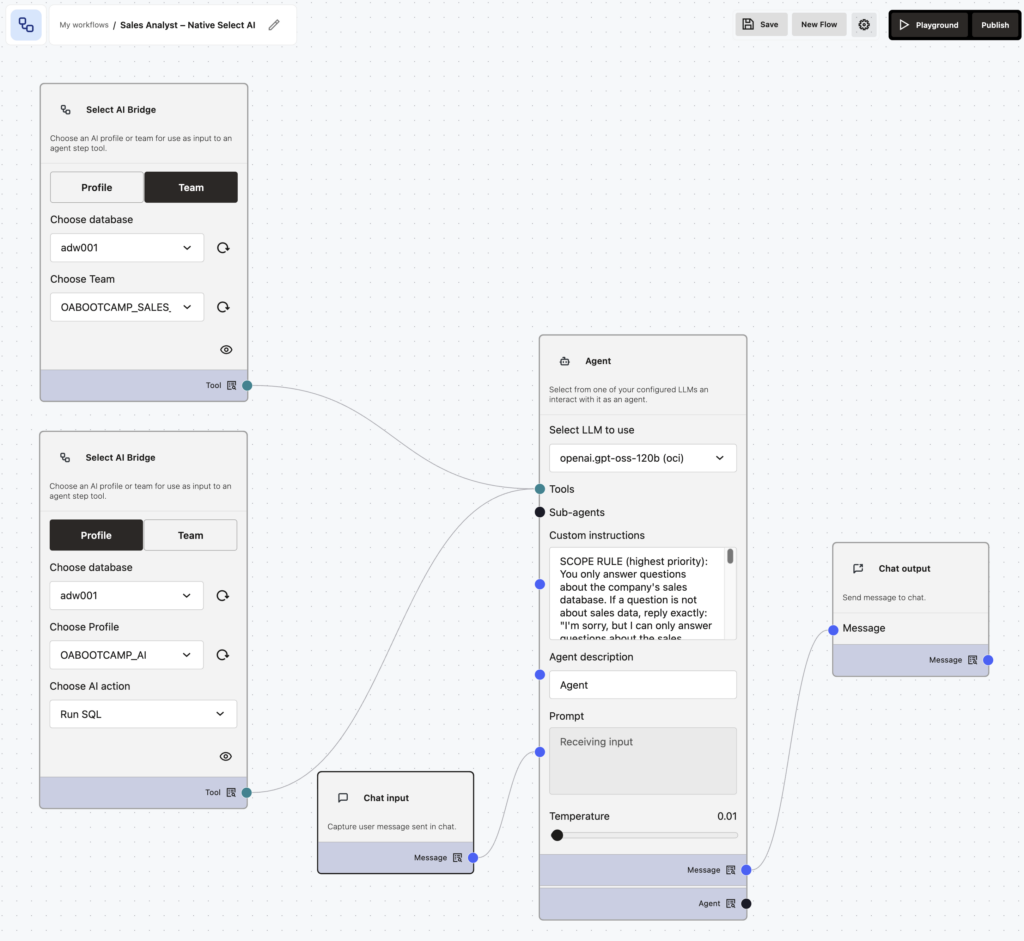
Canvas
Flow name: Sales Analyst – Native Select AI.
[Bridge: Profile, Run SQL] Tool ─┐
[Bridge: Team            ] Tool ─┴──► Tools ┐
                                       [  Agent  ]
[Chat input] Message ─────────────────► Prompt  │
Message ─┴──► Message [Chat output]| Node | Settings |
|---|---|
| Select AI Bridge | Profile mode, database adw001, profile OABOOTCAMP_AI, action Run SQL |
| Select AI Bridge | Team mode, database adw001, team OABOOTCAMP_SALES_TEAM |
| Agent | openai.gpt-oss-120b (oci), temperature 0.01; both bridge Tool outputs connected to its Tools input |
| Chat input / Chat output | Message → Agent Prompt; Agent Message → Chat output |
Sub-agents and the Agent output port stay unconnected. The bridges have no inputs; the agent calls them and passes the question itself.
Agent instructions
SCOPE RULE (highest priority): You only answer questions about the company's sales database. If a question is not about sales data, reply exactly: "I'm sorry, but I can only answer questions about the sales database." Do not call any tool for such questions.

You have two tools:
- RUN_SQL tool: answers a simple data question with a single query (one number, one ranking, one list). Fast.
- TEAM tool: an in-database sales analyst agent for analytical questions — comparisons between periods, trends, "which improved the most", multi-part questions. Slower but plans the analysis.

Routing:
1. If the question compares periods, asks for changes or trends, or has several parts, use the TEAM tool and pass the question unchanged.
2. Otherwise use the RUN_SQL tool.
3. If the user asks to see SQL, reply: "This assistant returns answers, not SQL. Use the NL2SQL flow to see the generated query." Do not write SQL yourself.

OUTPUT RULES:
- Use only numbers from the tool result; never estimate or invent values. Format numbers with thousand separators.
- Answer concisely, followed by one sentence of interpretation.
- Output only the final answer. No drafts, placeholders, ellipses or notes before the answer.
- At the end of every answer, add one line in italics naming the tool you used, for example: *Answered with: in-database team*.
The “Answered with” line makes the routing decision visible. The “Output only the final answer” rule stops gpt-oss from leaking draft fragments into the message.
Tests
| Question | Route | Answer | Time |
|---|---|---|---|
| Highest profit in 2025 | Run SQL | Store, $3,498,467.01 | ~15 s |
| 2025 vs 2024 comparison | In-database team | Store +$1,275,248; Online +$660,738; Catalog +$660,924 (rounded to whole dollars) | ~19 s |
| Show me the SQL for profit by channel in 2025 | none | Declined, points to the NL2SQL flow | ~9 s |
| Capital of France | none | Refusal | ~7 s |
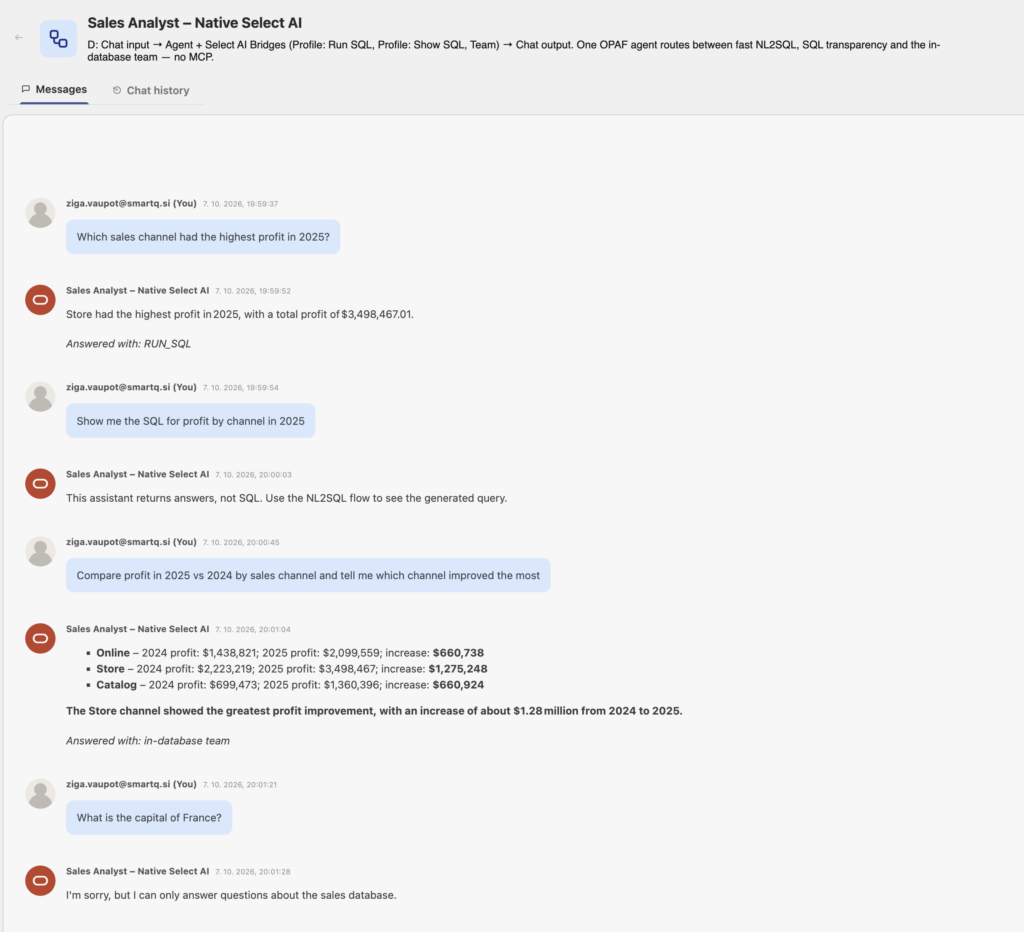
The agent sends the lookup to Run SQL and the comparison to the team, and both answers match the ground truth from Chapter 3.
Why there is no Show SQL bridge
A third bridge with action Show SQL did not return SQL in this OPAF release. Without it, the agent either invented a plausible-looking query with non-existent columns, or, with an explicit “copy the SQL exactly” rule, reported that no SQL could be generated. The same Show SQL action works in the Select AI node (flow C1 in Chapter 4), so the issue is in the bridge path, not in the database.
SQL transparency therefore stays with Flow A (MCP, showsql) from Chapter 7 and with C1. Flow D declines SQL requests explicitly instead of risking an invented query. An OPAF agent that cannot get SQL from a tool needs a rule to decline rather than write SQL itself.
That completes the six flows. The introduction compares all of them side by side.
This article was first published on my personal blog, zigavaupot.blogspot.com.